

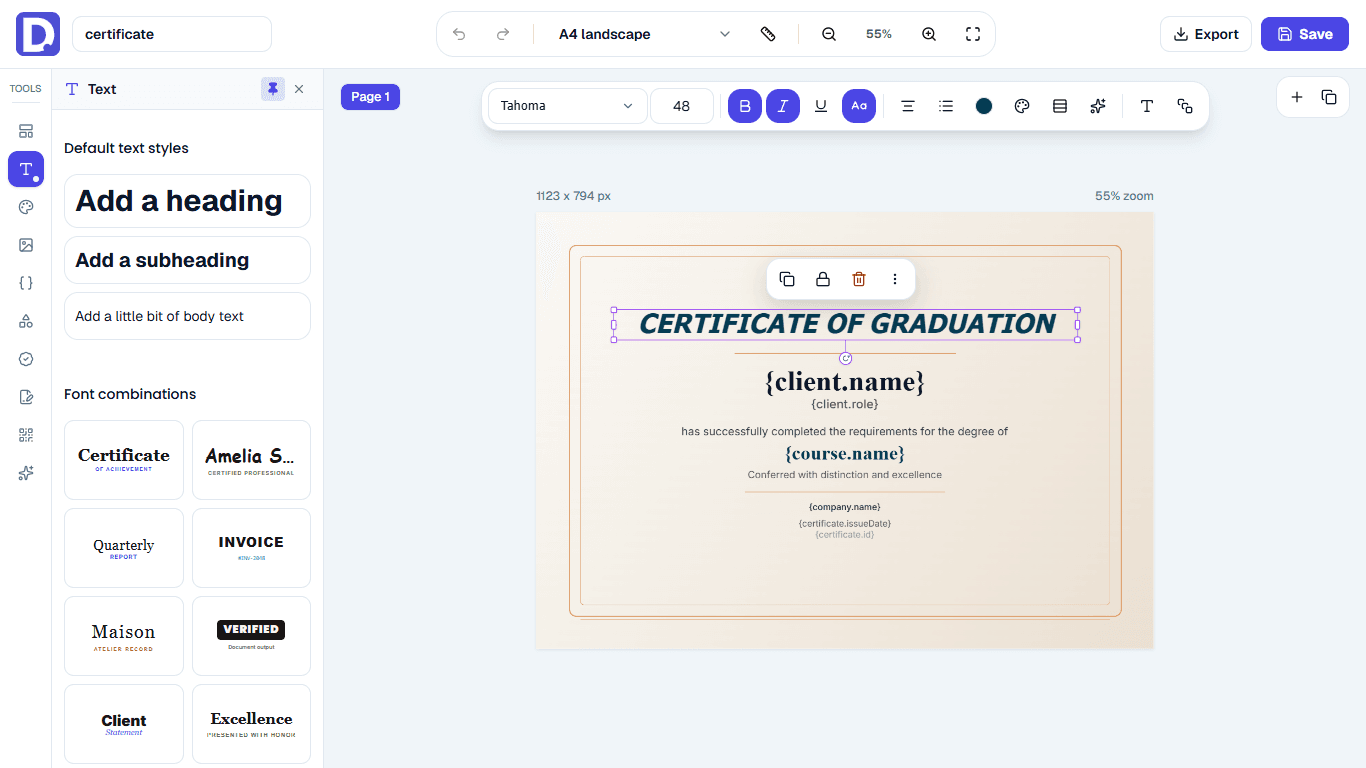

Generate certificates

Every document,
on autopilot.

Design a template once. Docit fills it from a CSV or your API, or straight from Claude, ChatGPT or Gemini, and hands back pixel-perfect PDFs and PNGs, ready to send or sign.

  • No credit card
  • PDF & PNG output
  • Works in Claude, ChatGPT & Gemini
Docit beaver

Docit in about a minute.

Template editor

Design on a simple drag-and-drop canvas.

Place text, images, shapes, tables and dynamic fields exactly where they belong.

  • Drag-and-drop editor
  • Dynamic placeholders
app.docit.io
Docit editor panel

Works inside your AI assistant

Just ask your AI.Docit does the work.

Install Docit in Claude, ChatGPT or Gemini and talk to the assistant you already use. Design templates, fix a layout or generate a thousand documents from a CSV, all from the chat.

ClaudeDocit connected
Create a course certificate with name, course and date fields.
DDocit · Create template

Certificate

{{name}}

{{course}} · {{date}}

Your Course certificate is ready with 3 fields. Want me to generate some?

attendees.csvGenerate one for everyone in this file.
DDocit · Generate from CSV
248 of 248 certificatesPDF
certificates.zip
Ask Claude to make a document…
  1. 1Add the connectorPaste the Docit connector URL into Claude, ChatGPT or Gemini.
  2. 2Sign in onceApprove access with your Docit account. No API keys to copy.
  3. 3Just askCreate, edit, preview and bulk-generate documents from the chat.

Everything from the chat

  • Create, edit and duplicate templates
  • Preview a template before generating
  • Generate a single PDF or PNG
  • Bulk-generate from a CSV and track progress
  • Browse versions and restore an older one
  • Create background assets for designs
Get your connector

One engine, four ways in

Every row endswith a document.

Docit plugs into the data you already have. Each row, payload or message becomes a validated, rendered and stored file, from the same template every time.

CSV bulk generationdocit

recipients.csv

Ready for processing

124 rows
client.name
course.name
Ayesha Khan
Product Design
Ali Raza
Web Development
Sara Ahmed
Data Analytics
Required columns validated

Payload validation

Catch missing fields before rendering.

Queued processing

Large generation jobs run reliably.

Generated history

Review and access previous output.

Ready-to-use URLs

Download, share, print, or embed.

Why a template engine

A real template,not a mail merge.

Mail merges paste values into a document and hope it fits. Docit renders every file from a designed template, checks the data first, and keeps the result.

Mail merge · copy-paste

What most teams still do

Certificate of completion

«FirstName» «LastName»

completed «Course_Name_Long_Value_Overflowing_The_Box»

#REF!

Same layout, broken for long names

  • Copy-paste per recipient
  • Layouts break on long values
  • No check for missing data
  • Files lost in shared folders
  • Signatures chased by email

Docit · template engine

What Docit generates, every time

Certificate of completion

Ayesha Khan

completed Advanced Product Design

Pixel-perfect for every row

  • One template, every recipient
  • Text fits, layouts hold
  • Rows validated before render
  • Every file stored with history
  • E-sign built into the flow

Everything around the document

Your document pipeline,
on autopilot.

Generating the file is the headline. Fields, signatures, approvals and history run too.

Offer letter

Dear {{name}},

Start date {{start_date}}

A visual editor with real data fields

Drop {{placeholders}} anywhere: text, images, QR codes, tables and signatures. Design stays pixel-perfect for every row.

Signed by

Sara Ahmed

Oct 18, 2:41 PMSigned

E-signatures built in

Send signing links, track every recipient and get the signed PDF back.

“A modern event badge with a QR code and the attendee’s company.”
Template drafted · 6 fields

Templates from a prompt

Describe the layout, get an editable template with fields in place.

Certificate for Ali Raza, please.
ClaudeChatGPTGemini
certificate.pdfready

Generate from your AI chat

Ask Claude, ChatGPT or Gemini. Docit makes the file and hands it back.

1,246 rows valid
2 rows missing course.name

Validation before render

Missing columns are caught up front, not after 1,000 broken PDFs.

  • Course certificates1,248 files2m
  • October invoices312 files1h
  • Event badges540 files1d

Every file, with history

Each batch is stored with its source and output, ready to download, share or re-run.

How it works

Three steps, then it runs itself.

  1. 01

    Design your template

    Start from scratch, a starter design or a prompt. Drop data fields where the details go.

    About 5 minutes
  2. recipients.csvmapped

    02

    Connect your data

    Upload a CSV, call the API or just ask your AI assistant. Docit maps your columns and checks every row.

    About 2 minutes
    • Ayesha_Khan.pdf
    • Ali_Raza.pdf
    • Sara_Ahmed.pdf

    03

    Docit runs it

    Every document is rendered, stored with history and ready to download, share or send for signature.

    Every time, without you

Use cases

Use cases for every document workflow

See which document jobs fit CSV bulk generation, API automation, e-signature workflows, or reusable template editing.

Education

Course certificates

Generate branded completion certificates for every learner directly from your LMS data, training spreadsheet, or course platform export. Best when you need to issue certificates for many students, trainees, or workshop attendees at once.

CSV bulk generation
Upload CSV rows
Explore course certificates
CSV bulk generation
  1. 1Learner data
  2. 2Certificate template
  3. 3Verified PDF
Unique learner namesCourse detailsVerification IDs

People operations

Employee documents

Create offer letters, payslips, onboarding packs, employment certificates, and internal HR documents from employee records. Best when documents should be generated from your HRIS, payroll tool, or onboarding form without manual editing.

API generation
Send API payloads
API generation
  1. 1HR record
  2. 2Company template
  3. 3Employee document
Offer lettersPayslipsOnboarding packs

Events

Event badges

Produce print-ready attendee badges with personalized names, ticket types, company names, and scannable QR codes. Best when you have a guest list and need badges generated in bulk before the event starts.

CSV bulk generation
Upload attendee CSV
CSV bulk generation
  1. 1Guest list
  2. 2Badge layout
  3. 3QR badge
QR check-inTicket typesPrint-ready badges

Try it on yours

What will you generate first?

Pick a document and start from a ready-made layout. Your first templates are free.

Works with the data you already have.

  • Excel
  • Google Sheets
  • Airtable
  • Your CRM export
  • REST API
  • Claude
  • ChatGPT
  • Gemini

Anything that can export a CSV or send an HTTP request, plus the AI assistant you already chat with. API docs for the rest.

FAQs

Questions, answered.

The short ones are here. For anything else, talk to us.